Tracker or Charging Base Won’t Connect to the Internet or Wi-Fi - PetSafe® GPS Dog Tracker
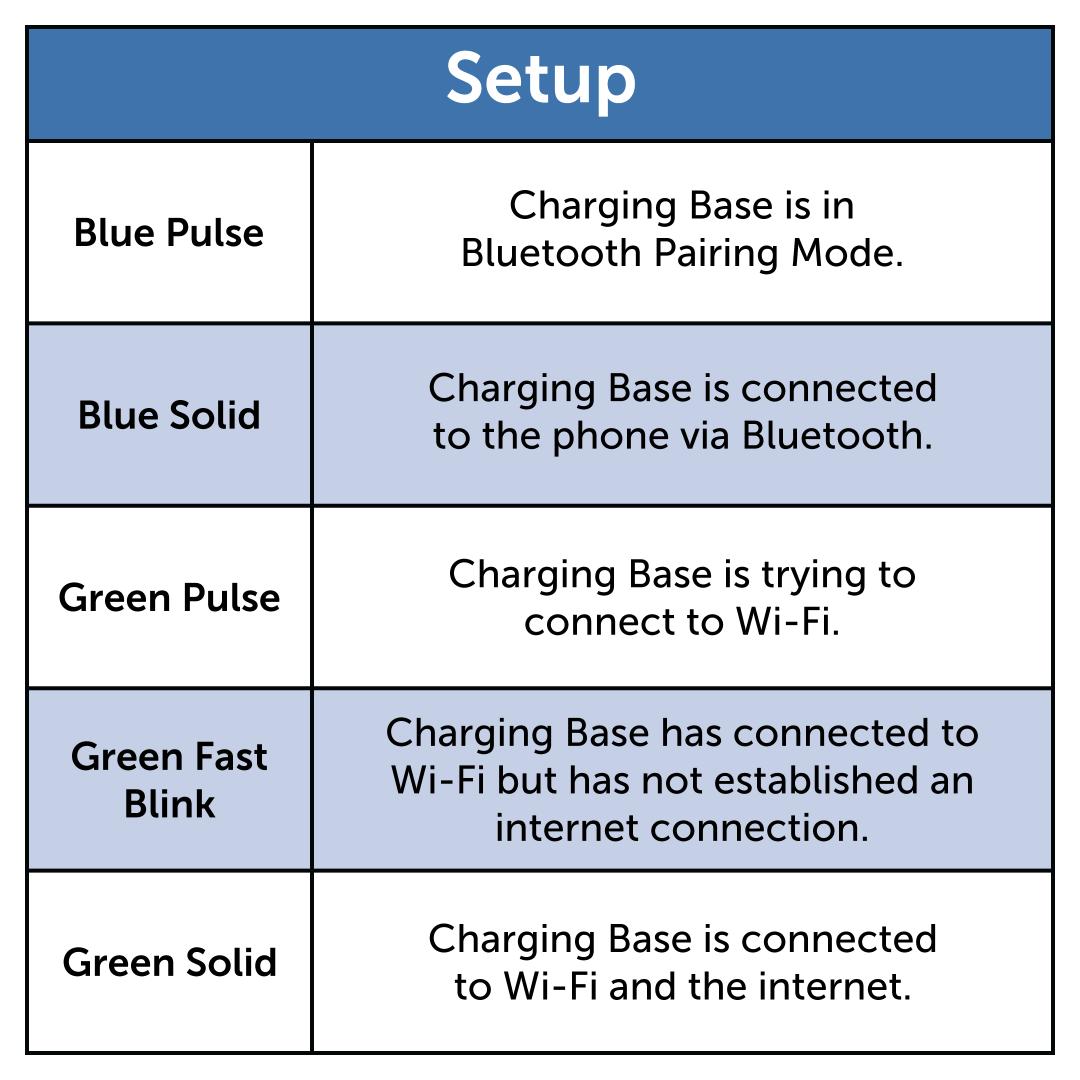
Important Information
- A fast-blinking green LED indicates that the Charging Base is connected to Wi-Fi but does not have an internet connection.
- A Charging Base may connect to the house’s Wi-Fi but may not connect to the internet. If the Charging Base is not connected to the internet, it will not communicate to app.
- When setting up the Charging Base, it can take a few minutes for it to connect to Wi-Fi and the internet.
- When the Charging Base connects to both Wi-Fi and the internet, it will have a solid green light.
- After initial setup, the Tracker will still function if the Charging Base does not have internet. However, without internet, neither the Tracker nor the Charging Base will receive automatic updates. Additionally, the Tracker will not enter Base Sync when near the Charging Base, which helps save battery life.
Confirm the Wi-Fi and internet is working. Check another connected device, such as your phone, in your house for Wi-Fi and internet to ensure you are able to connect to your home Wi-Fi and that you do not have an internet outage.
- If other connected devices have lost Wi-Fi connection, restart the Wi-Fi router. If it is still not resolved, contact your router company or internet service provider if they supplied the router.
- If other connected devices have lost internet connection, contact your internet service provider.
Move the Charging Base and your phone closer to the Wi-Fi router for the strongest signal.
Confirm that Bluetooth is turned on.
Confirm that your phone is connected to a 2.4 GHz Wi-Fi network. The system cannot pair to a dual-band (2.4 GHz and 5 GHz) network.
Confirm that the My PetSafe® app has permission to use Bluetooth under your phone settings.
If the issue has not been resolved, contact our customer care.