How to Setup My ScoopFree® Crystal Smart Automatic Litter Box
Set Up the Litter Box
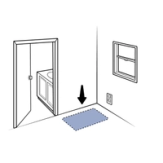
Select a location for your litter box, near a standard wall outlet.
Select a dry area with good airflow to maximize tray life and odor control.
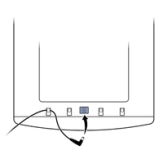
Insert the small end of the power adaptor into the socket on the bottom of the litter box frame. Slide the power adaptor cable under the clips on either side of the socket to secure it.
Do not plug the other end of the power adaptor into the wall outlet yet.
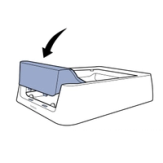
Insert the tabs on the waste trap cover into the slots at the front of the litter box frame. Press down on the waste trap cover until it snaps into place.
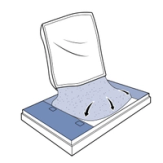
Pour the crystal litter into the litter tray and spread it evenly. Sprinkle one handful of the litter under the waste trap.
Place the litter tray lid under the litter tray. You’ll use this later when you change the litter tray.
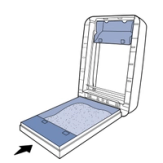
Lift the front of the litter box frame. Place the litter tray under it, making sure the waste trap on the tray is under the waste trap cover on the litter box frame.
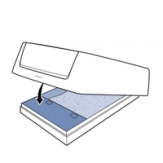
Lower the litter box frame. You’ll hear a click as the magnets on the waste trap cover connect with the magnets on the litter tray.
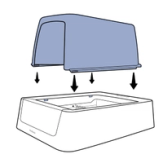
If your litter box came with a privacy cover, place it on top of the litter box, lining up the tabs at the bottom of the privacy cover with the notches in the top edge of the litter box. Press down firmly on the privacy cover to ensure all four tabs snap into place. If your cat has not used a covered litter box before, it may help to leave the litter box uncovered until your cat is comfortable using it.
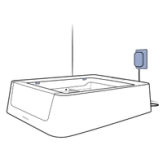
Plug the litter box power adaptor into the wall outlet.
(Important: If you have a kitten, leave the litter box unplugged until she is at least 6 months old.)
The litter box powers on, and the rake moves to the home position.
Connect to the App
For your box to connect to the app, you will need to make sure your Wi-Fi is 2.4GHz.
- Download the My PetSafe® app from your phone's app store, then open the app and follow the on-screen instructions to connect your litter box.
You will need a valid email address and your home Wi-Fi password.
The My PetSafe® app allows you to:
- Track your cat’s use of the litter box in real time to help detect common kitty health problems.
- Remotely activate the rake to ensure a clean litter box.
- Set up customized alerts like litter tray change reminders.
More Information
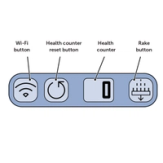
Here’s how it works:
- Sensors inside the litter box recognize when your cat is present.
- When your cat leaves the litter box, the rake button blinks blue and the rake timer starts a 20-minute countdown. (You can change the length of this countdown in the app.)
- When the countdown is complete, the rake moves any solid waste into the waste trap. (The crystal litter will absorb any liquid waste.)
- If your cat returns to the litter box during the countdown, the rake timer stops. The rake timer resets when your cat leaves the litter box again.
- Each time the rake activates, the health counter increases by one.
- To reset the health counter (recommended when you change the litter tray), press and hold the health counter reset button.
- To activate the rake manually at any time, press the rake button. To pause the rake while it is in motion, press the rake button again.
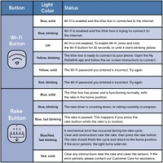
Wi-Fi and Rake Button Lights
Lights on the Wi-Fi and rake buttons change color to indicate litter box status.
Contact Customer Care
If you need further assistance, please contact our customer care team.